

IQOS ILUMA Light Guide: What Every Color and Symbol Means

You put in a fresh TEREA stick and press the button. Instead of a smooth warm-up, your device flashes a scary light. Don’t panic, and don’t throw it across the room. Most of these blinking codes are simple to fix, even the red ones.
You are not alone. Many people search for help within 7 to 30 days after they buy a device like this. Searches such as “blinking light,” “red light,” and “reset” make up as much as 40% of brand-specific searches for heated tobacco devices and e-cigarettes.
This guide covers the standard ILUMA, the PRIME, the compact ONE, and the newer touchscreen “i” series. It explains what each light is trying to tell you.
What Do the Lights on Your IQOS ILUMA Mean?
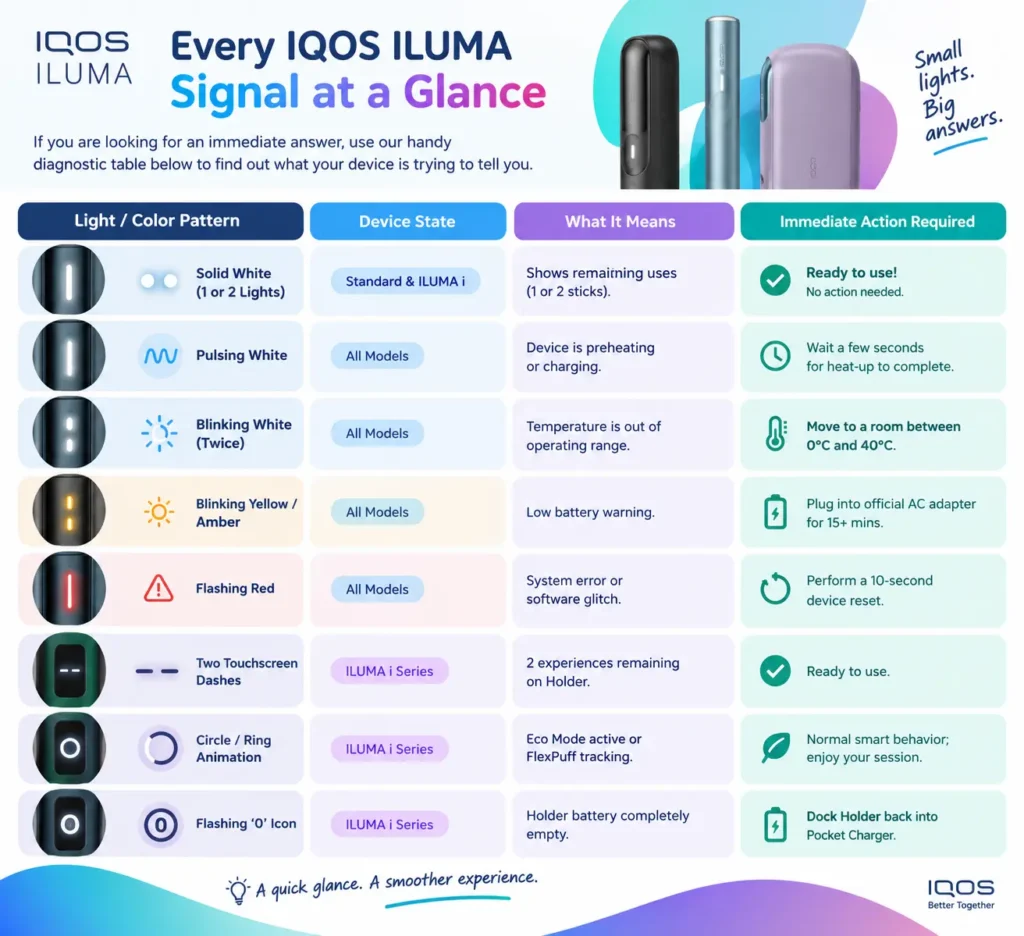
The light guide on your IQOS ILUMA shows your battery level, your heating status, and any error warnings with simple color signals. Solid white lights show how many uses you have left. A pulsing white light means the device is getting ready or charging. A blinking yellow or orange light means the battery is low, so you need to charge it. A blinking white light usually points to a temperature warning. A flashing red light is easy to fix. You can clean the contacts, or you can hold the button down for 10 seconds to reset the device.
Every IQOS ILUMA Signal at a Glance
Use this quick table to find your signal.
IQOS ILUMA i Touchscreen and Modern Light Indicators
The newest model, the IQOS ILUMA i, has no LEDs on the holder. It uses a smart touchscreen instead. Once you know these icons, you can use all of its newest features.

Understanding Touchscreen Symbols (Prime and Standard Models)
- Horizontal dashes (= or -): Tap or pick up the holder. Two lines mean you have two sticks back to back. One line means you have one session left before you need to recharge.
- The ring icon: A small counterclockwise circle means the device went into Eco Mode. This happens when you leave it idle for a while. It only saves battery.
- Two vertical lines (||): This is the Pause Mode prompt. To stop your session, swipe down on the screen. You must do this in the first three minutes or eight puffs.
- Four vertical lines plus a vibration: Pause Mode worked. Your session holds for up to eight minutes, and the TEREA stick inside is not wasted.
- A blinking zero (0): The holder has no power left. Put it back in the pocket charger for a couple of minutes.
Decoding Standard Holder and Pocket Charger Light Signals
The standard IQOS ILUMA, PRIME, and ONE devices use LED lights to show their status. Here is what each color means. Field reviews show that a low battery (blinking orange or yellow) and a temperature warning (blinking white) cause about 75% of all device interruptions.

1. Blinking Yellow or Orange (Low Battery)
This almost always means the battery is low. But there is a common trap. You plug in a dead device for five minutes and pull it out. Then it blinks amber again right away.
Heat-not-burn batteries need a minimum base charge before they will heat a stick. Use the official wall block, not a cheap gas-station plug. Let the device charge without a break for at least 15 to 20 minutes before you test it.
2. Blinking White Twice (Temperature Warning)
The sensors in your device only work between 0°C and 40°C (32°F to 104°F).
- If you left it in a freezing glovebox overnight, the battery slows down and shuts off to protect itself.
- If you left it on a sunny patio table in July, the thermal cutoff turns it off.
The fix: Bring it inside and let it sit at room temperature for 10 minutes. Do not put it near a heater or in the fridge. Sudden extreme changes in temperature can ruin the circuitry.
3. Flashing or Pulsing White (Operation and Countdown)
A slow pulse means the device is preheating the TEREA stick or charging in the case. On newer firmware, a gentle pulse near the end of a session has two possible meanings. Flex Puff may adjust your session time, or you may have about two puffs left.
4. Blinking or Solid Red (Error State)
A red light feels like the end, but about 80% of the time it is only a software glitch, a static charge, or dirty metal contacts. Reports show that errors needing a reset (blinking red) make up about 15% to 20% of all problems. Dirty contacts, extreme weather, and soft sensor locks often cause them. Before you make a warranty claim, try a forced reset.
Step-by-Step Device Reset Guide
Actually, a simple reset fixes almost 90% of minor software glitches!

ILUMA and ILUMA i (Standard and Prime)
And here is how to reset the standard two-piece models:
-
Place Holder Inside: Put the holder inside the pocket charger.
-
Press and Hold: Press and hold the pocket charger button for 10 seconds.
-
Watch Lights: All lights will turn off and then flash white twice.
-
Release Button: Let go of the button. Your device is now completely reset!
ILUMA ONE and ILUMA i ONE
And for the all-in-one compact models:
-
Press and Hold: Press down the main button on the body for 10 seconds.
-
Watch Lights: The lights will turn off and then pulse white.
-
Release Button: Let go of the button once the vibration happens.
What If the Light Comes Back After Resetting?
Actually, if that red or orange warning light pops up again immediately after resetting:
-
Hardware Glitch: The internal sensor might be faulty.
-
Deep Discharge: Leave it plugged into an official charger for 30 minutes without touching it.
Real-World Triggers You Might Not Think About

If your device keeps showing errors, check these common causes.
Pocket lint and dust: Look inside the bottom of the charger tube. Dust or lint on the tiny golden contact pins stops the charger from reading the holder’s battery level. That triggers a red light. Wipe the pins gently with a dry cotton swab once a month.
Crooked TEREA insertion: The ILUMA uses magnetic induction to heat the tiny metal strip inside each TEREA stick. If you force in a bent stick, or don’t push it straight down to the printed line, the sensors panic. The device shuts off and flashes orange or red.
Keeping Your IQOS ILUMA Running Smoothly
The blinking lights are just your device talking to you. Most warnings need only a quick charge, a rest at room temperature, or a 10-second reset. Keep the charging contacts clean and use official adapters. That helps you avoid almost every common error, so you can enjoy your TEREA sticks with no hassle. Official support sites and social media pages also put quick troubleshooting first. A study of Philip Morris International in 59 countries (Abroms et al., 2023) found that these channels focus on fast fixes and signal help. This lowers returns and customer service work.
Frequently Asked Questions
Why is my IQOS ILUMA still showing orange after I just charged it?
And this usually happens because the power source was too weak. Make sure you use the official power adapter and USB cable to charge it directly from a wall outlet.
What does a red light right after a reset usually mean?
Actually, a red light immediately after a reset means the internal system still detects a hardware fault or the unit is severely overheated.
What do the symbols on the IQOS ILUMA i touchscreen mean?
And the touchscreen symbols show your remaining sessions (dashes), pause status (vertical lines), battery level (zero), and heating progress (circle ring).
Can extreme weather or heat cause the red light to appear?
Actually, yes! Extreme heat or cold causes safety sensors to lock the device, showing blinking white or red lights until temperature normalizes.
Is a red or blinking light dangerous?
And no, a blinking light is usually just a safety warning to protect you and the device. But if the body feels burning hot, stop using it right away.
Can I keep using the device while a light is blinking?
Actually, if it is pulsing white, yes, because it is just heating up. But if it is blinking orange or red, you should charge or reset it first.
What should I do if none of these fixes work?
And if zero fixes work, simply visit an official IQOS store or contact their customer care team online to claim a warranty replacement!