

How to use IQOS ILUMA Prime Kit Device

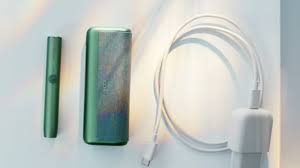
The IQOS ILUMA PRIME is a heat-not-burn device designed to work only with TEREA smart tobacco sticks, using induction heating instead of a blade. That means it heats the stick from inside rather than burning it, and it does not require cleaning the heating element. Below is a complete step-by-step explanation of how to use it properly.
1. Charging the device before first use
Before using your IQOS ILUMA PRIME, you must fully charge it.
Start by connecting the Pocket Charger to a power source using the official charging cable and adapter. A full charge usually takes about 2 hours (around 135 minutes). While charging, the indicator lights on the device will show the battery level gradually increasing.
Once charged:
- The Pocket Charger stores power for multiple uses of the Holder.
- The Holder itself sits inside the Pocket Charger and charges automatically when inserted.
It is important to fully charge the device before first use to ensure stable performance and full usage capacity.
2. Turning the device ON and OFF
To turn the device on or off, locate the button on the Pocket Charger.
- Press and hold the button for about 4 seconds.
- The status lights will indicate whether the device is ON or OFF.
When it is on, you can check how many “uses” (experiences) are available in the Holder:
- 2 lights = fully charged (2 uses available)
- 1 light = 1 use available
- No lights = Holder needs charging inside the Pocket Charger
This system helps you always know when your device is ready.
3. Preparing the Holder for use
Take the IQOS ILUMA PRIME Holder out of the Pocket Charger.
Before using:
- Check the lights to confirm it has at least one charge.
- Make sure the Holder is clean and dry (no maintenance needed inside heating chamber).
The device is now ready for a TEREA stick.
4. Inserting the TEREA stick correctly
This is a very important step.
Take a TEREA stick and gently insert it into the Holder.
- Insert it straight into the heating chamber until it fits properly.
- Do not twist or force it.
- Only use TEREA sticks, as other sticks will not work.
Once inserted, the device automatically activates Autostart in most cases.
5. Heating process (preheating phase)
After inserting the stick, the device begins heating automatically.
You will notice:
- A vibration and slow pulsing light = heating started
- Wait for a second vibration = device is ready to use
This heating process usually takes a few seconds.
At this point, the device is preparing the tobacco stick to produce aerosol (vapour-like experience instead of smoke).
6. Using the device during a session
Once ready, you can start inhaling normally.
During use:
- The Holder gives feedback through vibrations and lights.
- It may also show remaining session time using light indicators.
- You can take slow, steady draws.
There are usually two key alerts during use:
- One vibration = time is running low
- Two vibrations = session almost finished (last puffs remaining)
A single session typically lasts a few minutes.
7. Ending the session
When finished:
- Remove the used TEREA stick carefully.
- Do not reuse the same stick again.
After removing the stick, the Holder automatically stops heating.
You can then place the Holder back into the Pocket Charger if you want to recharge it for the next use.
8. Recharging between uses
After each session, the Holder needs to be recharged.
To do this:
- Insert the Holder back into the Pocket Charger.
- The lights will show charging status.
- One or two solid lights mean it is ready for future use.
Charging between uses is fast, so the device can be used multiple times in a day depending on battery level.
9. Smart features and gestures
The IQOS ILUMA PRIME also includes smart functions:
- Lift function: lifting the Holder shows remaining uses.
- Double-tap feature: tapping the Holder can show remaining session time through vibration patterns.
- Auto-start: automatically begins heating when a TEREA stick is inserted (can be turned off in settings).
These features make usage more interactive and convenient.
10. Important usage tips
To keep your device working properly:
- Only use TEREA sticks, nothing else will fit or work correctly.
- Always charge using approved accessories.
- Avoid using the device if it is too hot or too cold.
- Do not force sticks into the Holder.
- Store the device in a dry place away from moisture.
11. Common mistakes to avoid
Many users experience issues when:
- Using non-compatible sticks (device will not heat)
- Not charging the Pocket Charger regularly
- Inserting the stick incorrectly or too forcefully
- Removing the stick too early during heating
Avoiding these mistakes ensures smoother performance.
Conclusion
Using the IQOS ILUMA PRIME Kit is quite simple once you understand the steps: charge the device fully, turn it on, insert a TEREA stick, wait for the heating vibration, and then use it during the session. After finishing, remove the stick and recharge the Holder.
Its design is focused on convenience, so most actions are automated, especially the heating and charging system. With correct use and proper charging habits, the device can deliver consistent performance throughout the day.